Short version
RAG is often explained too simply: split documents into chunks, create embeddings, store them in a vector database, retrieve a similar passage, and pass it to the model. That is enough for a demo. It is not enough for working systems with part numbers, VINs, orders, tables, policies, calls, and access rules.
Vector search is good at semantic similarity. A user asks about returns, and the system finds a return policy even if the wording differs. But exact order numbers, part codes, dates, trims, names, states, document versions, and rare terms often need full-text search.
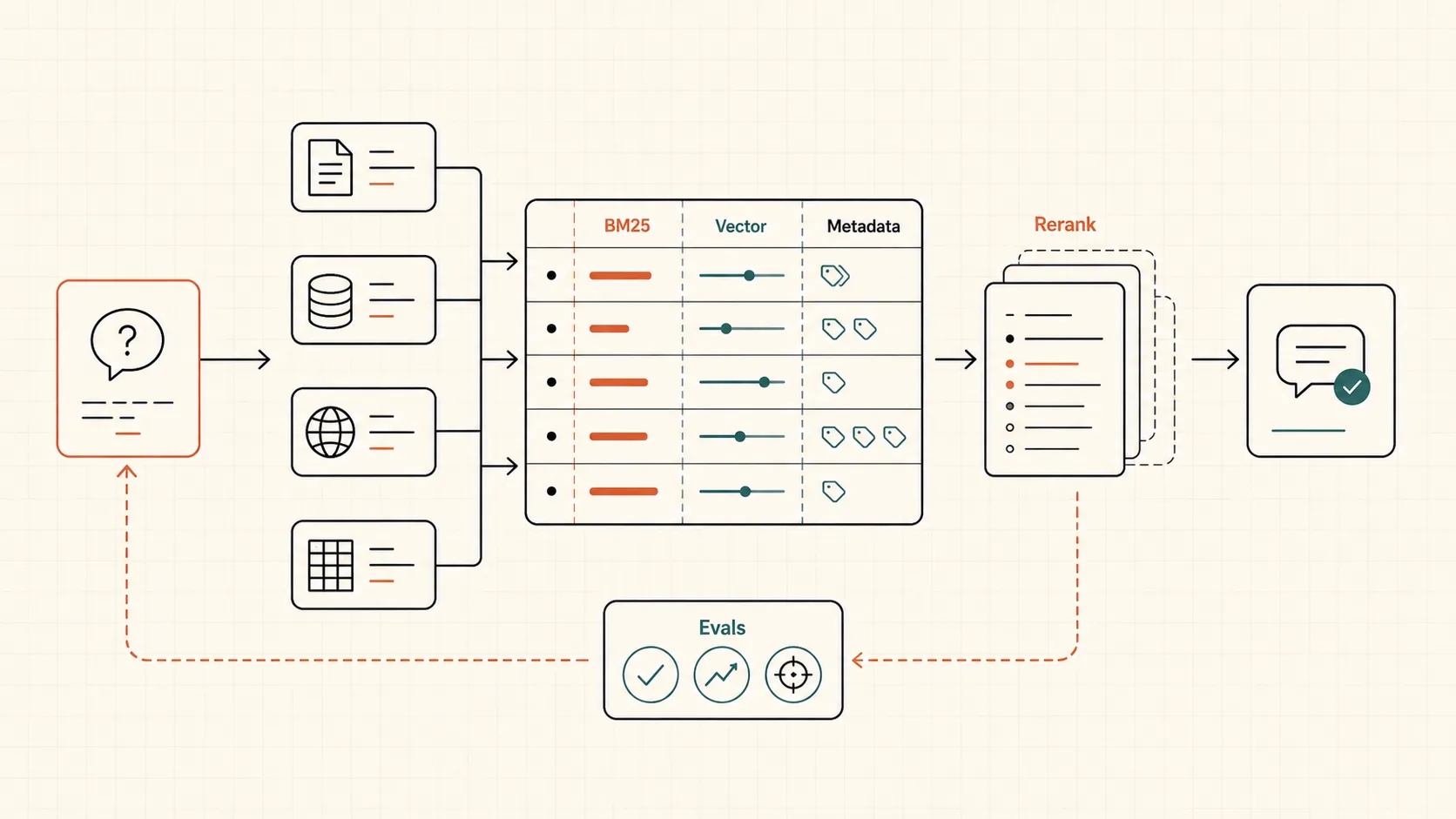
Production RAG usually becomes a search system, not just “chat with documents”. It needs ingestion, normalization, metadata, BM25, vector search, fusion, reranking, context assembly, source citations, refusal rules, and evals.
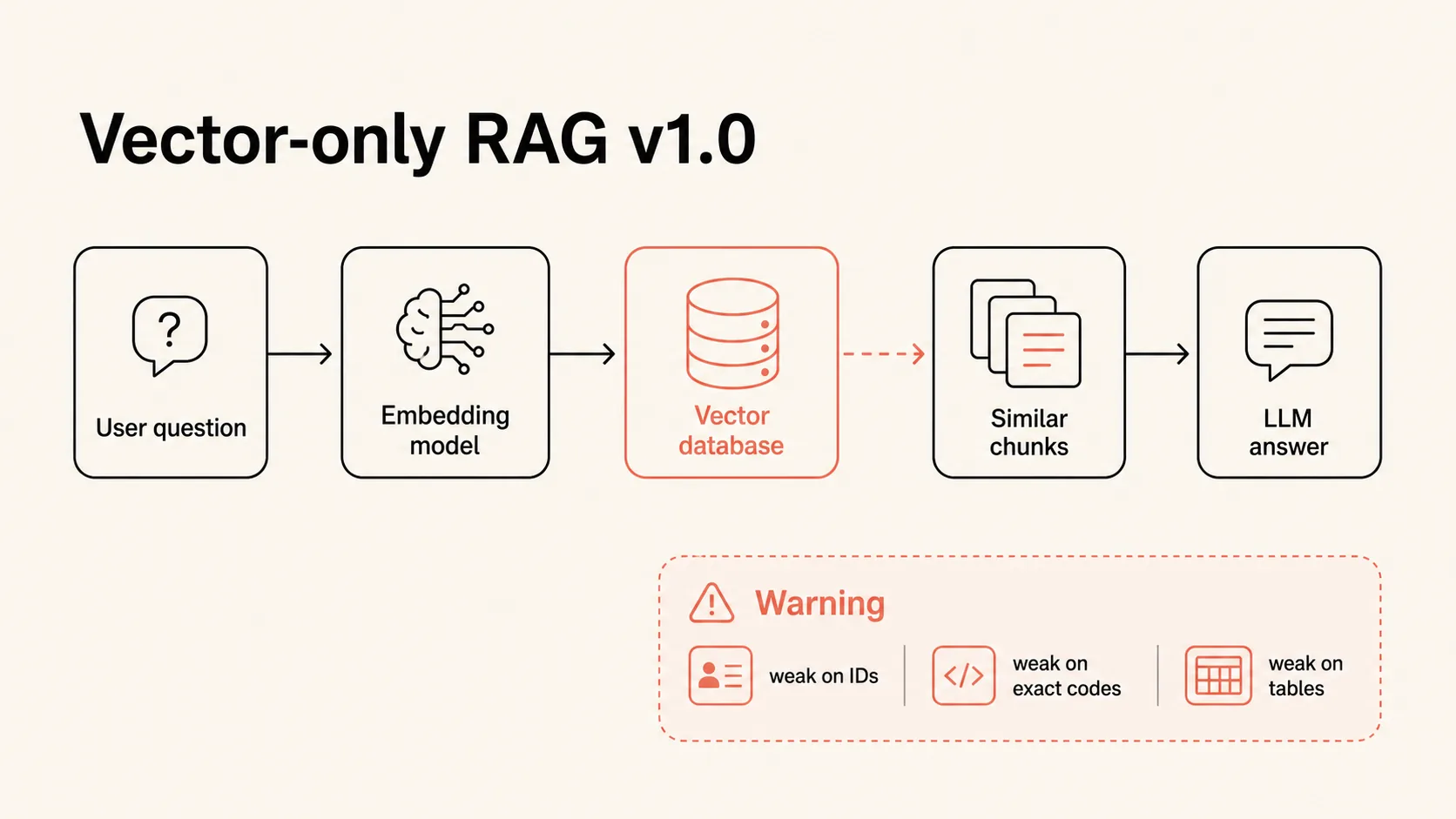
In the AI CRM project, this showed up fast. The first vector-search version was technically “RAG”, but it created noise for managers: during customer conversations, it surfaced irrelevant hints. The system distracted people because similar text was not always the right source.
Quality improved not because of one magical model, but because of engineering around retrieval: user feedback, synthetic retrieval evals, full-text search for exact IDs, query translation, HyDE, metadata filters, SQL over structured data, and agentic RAG for compound questions.
What RAG actually does
RAG stands for Retrieval-Augmented Generation. In plain terms, the model answers from retrieved source context instead of relying only on model memory.
But the important part is not merely “giving documents to the model”. The path matters:
- Sources are pulled from files, CRM, databases, sheets, email, calls, or internal systems.
- Data is shaped for search: text, chunks, metadata, versions, and access rules.
- The user query is interpreted and sometimes rewritten.
- Retrieval must return useful candidates, not just similar passages.
- Results are fused, reranked, and filtered.
- The model answers from context and refuses when evidence is missing.
- Quality is measured separately for retrieval and for the final answer.
That is why “we need a vector database” is usually too narrow as a starting point. A vector database is one component, and the extra components are one reason RAG changes the implementation budget.
Why embeddings do not solve everything
Embeddings turn text into a numeric vector. If two texts are semantically close, their vectors usually sit near each other. This is powerful when users ask questions in natural language.
For example:
- “how do I return an item” can find a return policy;
- “what if an employee is sick” can find the HR sick-leave instruction;
- “what warranty do we offer” can find the relevant contract section.
But vector similarity is weak when the answer depends on exact matching:
S12345as an order number;DSK-567as a part number;2023 GMC Terrain SLT AWDas a specific trim;Californiaas a delivery state;- a date, version, VIN, contract number, or internal code.
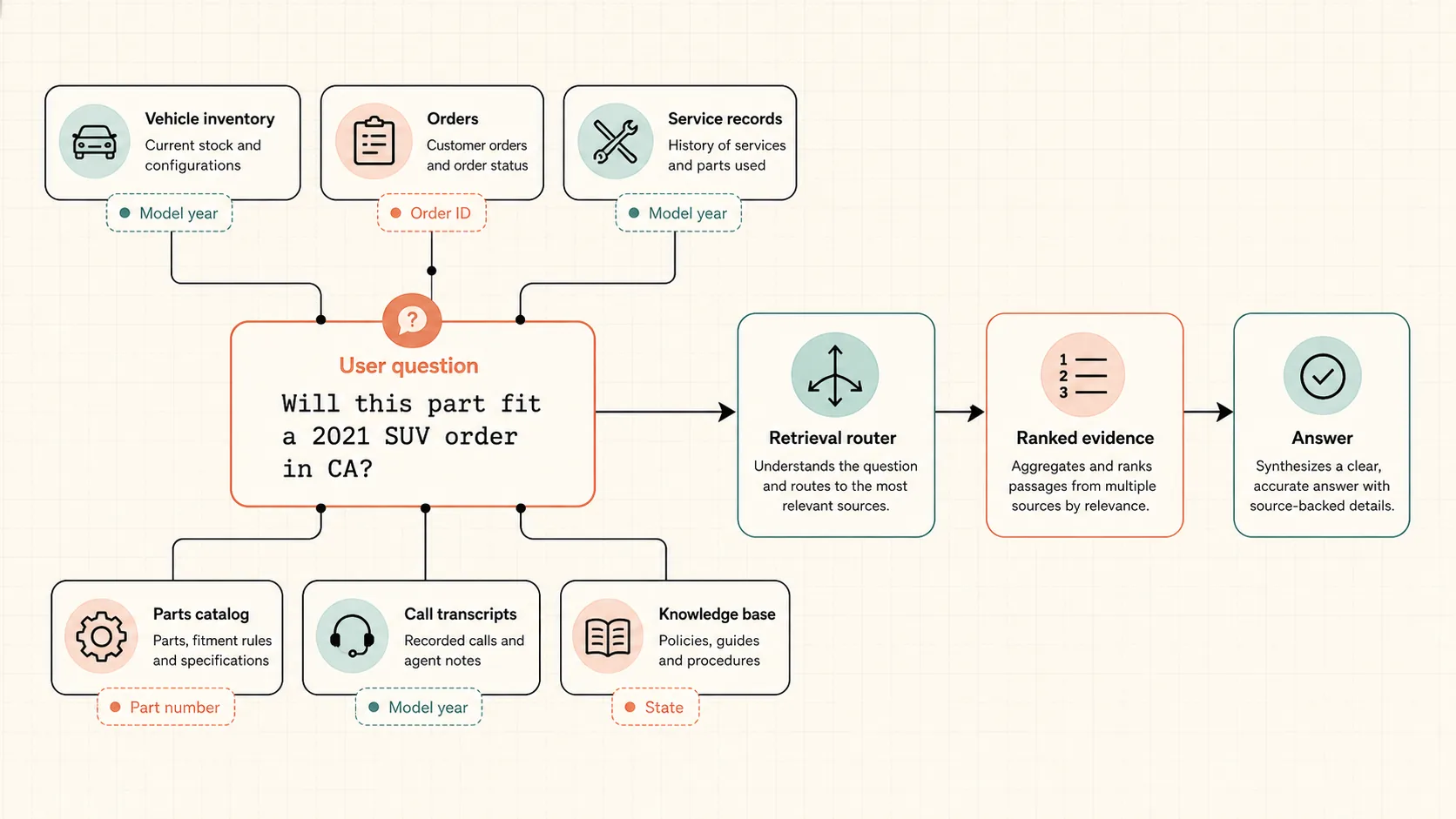
If a user asks whether a part fits a 2021 SUV, the system should not find a “similar article about parts”. It needs compatibility by model, year, trim, order, and rule. Sometimes full-text search or SQL filtering is more honest than the nicest embedding.
What production RAG looks like
Working RAG usually has several retrieval paths in parallel. BM25 catches exact terms and codes. Vector search catches semantic similarity. Metadata filters narrow results by date, document type, customer, product, role, or order status. Candidates are then fused, often with Reciprocal Rank Fusion, and reranked.
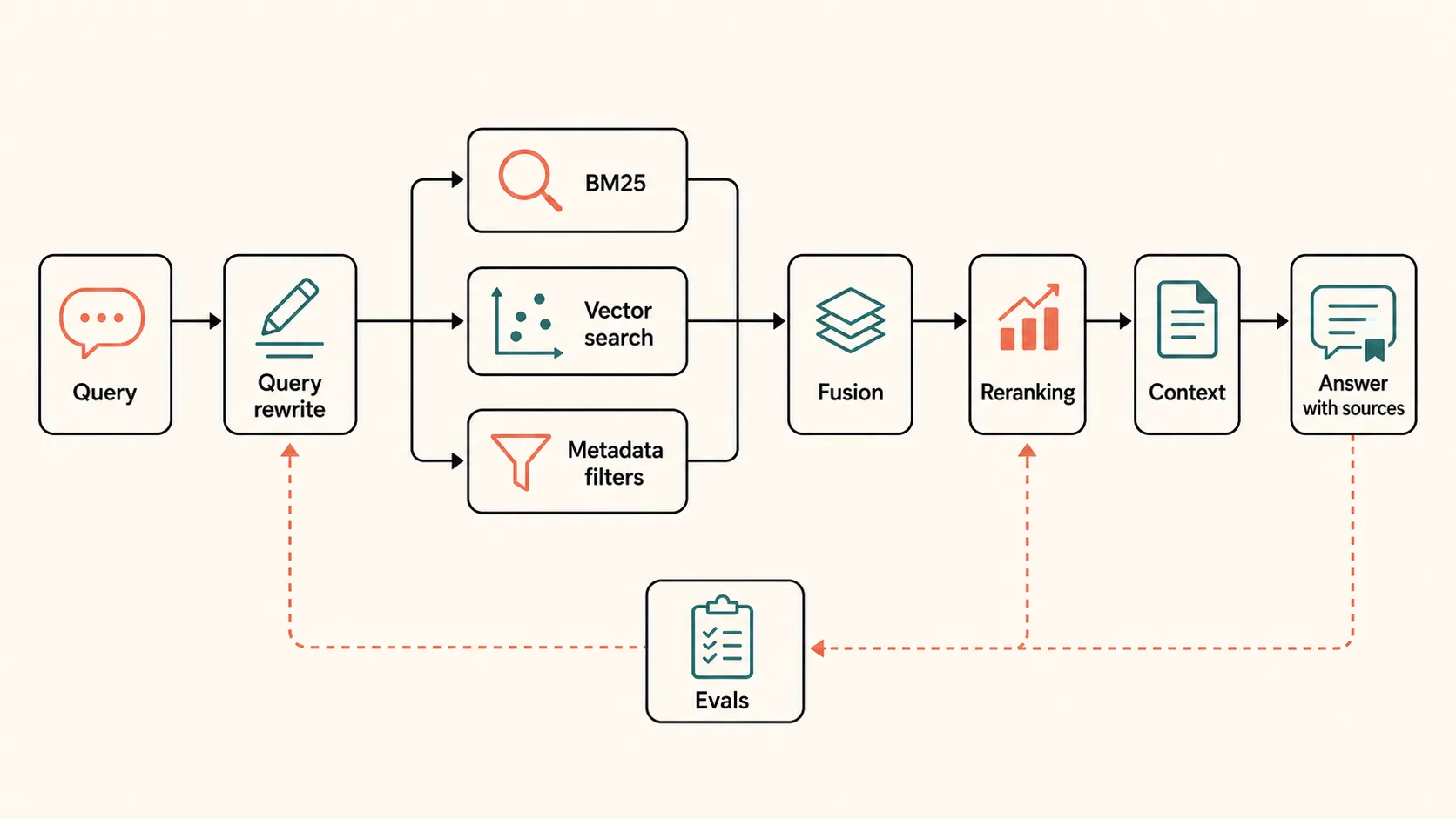
In practice, that means:
- Ingestion: pull documents, records, sheets, and system data.
- Normalization: clean text, extract fields, preserve dates, IDs, and relationships.
- Chunking: split material so a chunk can answer a real question instead of cutting a table in half.
- Hybrid retrieval: search by meaning and by exact words.
- Fusion: combine candidates from different retrieval methods.
- Reranking: re-score top candidates with a model or cross-encoder approach.
- Context assembly: build short, useful context for the LLM.
- Answering: answer with sources and a clear confidence boundary.
- Evals: check that retrieval found the right source and the answer did not add facts.
Automotive RAG Assistant: where vector RAG failed
The case started with a clear business idea: an automotive company had many customer touchpoints: email, messages, calls, orders, service, vehicles, and parts. The assistant was supposed to surface relevant information while managers worked. If a call was about a car, show car data. If it was about an order, show order status. If it was about part compatibility, find the rule and evidence.
The first version was classic RAG: documents were chunked, embedded, stored in a vector database, the user query was embedded, nearest chunks were sent to the model. It looked correct. In practice, managers received irrelevant hints, got distracted, and treated the system as worse than no system.
The root cause was not a “bad LLM”. Retrieval returned the wrong context. Once the context is wrong, the final answer is already compromised.
What changed in retrieval
The first important change was feedback. The interface exposed likes, dislikes, and short notes about what went wrong. People did not use it much at first, but once they saw that feedback directly improved the system, it became useful signal for the team.
Then came synthetic retrieval evals. The system would take a chunk, generate possible questions that the chunk should answer, and check whether retrieval returned that source. This made it possible to measure precision and recall without waiting for every live conversation.
The largest category of failures involved exact identifiers: an order number, part number, specific model, year, series, or state. Full-text search was added for that. Not instead of vector search, but alongside it.
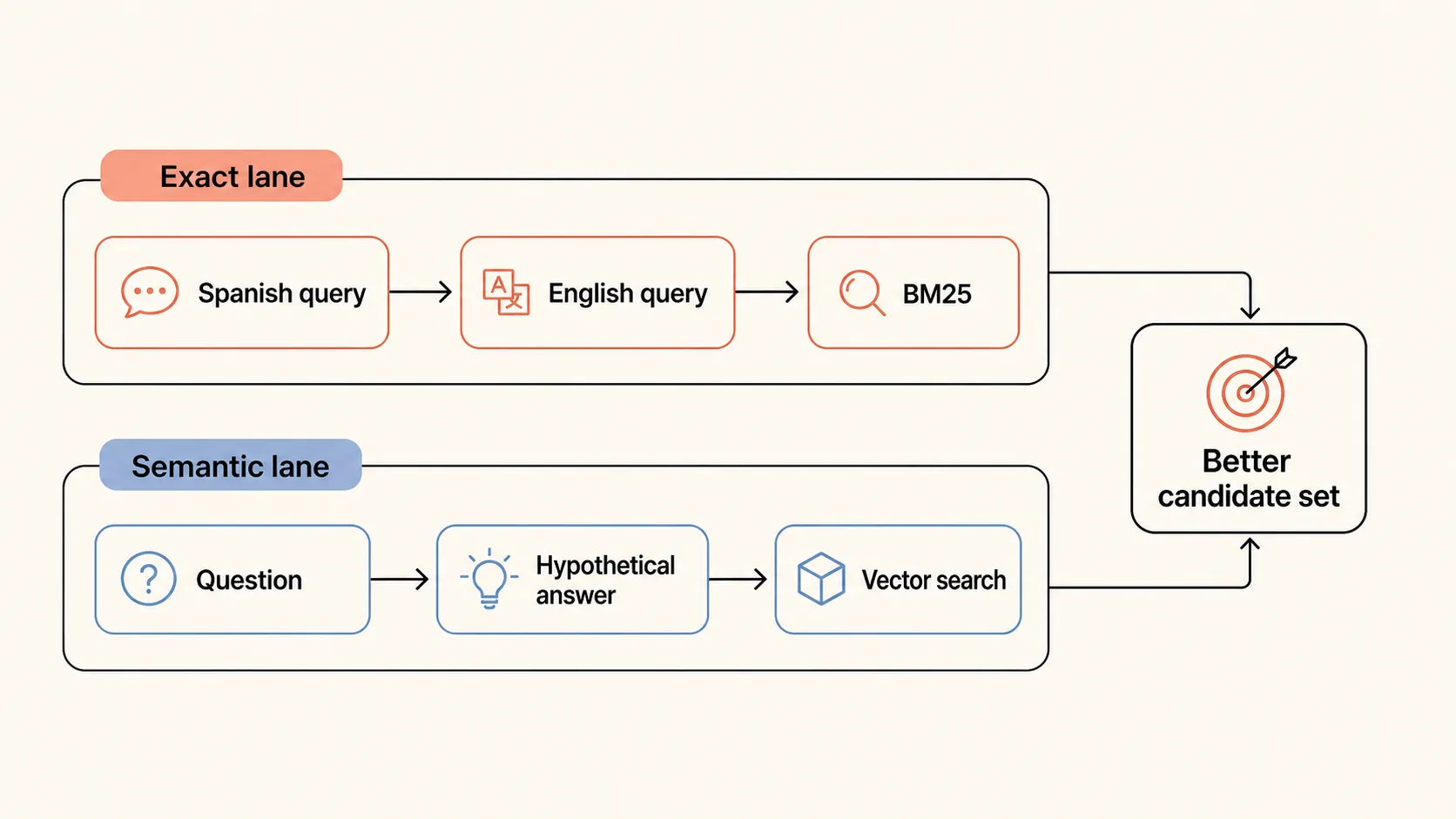
Then a language issue appeared: some queries came in Spanish, while full-text search over English sources missed them. The solution was query transformation: translate or normalize the query before search. For semantic retrieval, a related technique is HyDE: generate a hypothetical answer first, then use that for vector search.
The next step was structuring the data. The project had PDFs, call transcripts, notes, car data, order data, and parts data. Inside that mess, there were still fields: ID, date, model, status, city, trim, and part number. LLMs are useful for extraction, and those fields can then go into SQL or metadata.
After that, the system could answer a different class of questions:
- “Is order
S12345ready?” - “Will R17 wheels with part number
DSK-567fit my 2020 Mazda CX-5?” - “How long does delivery to California take on average?”
- “Which car in inventory has been unsold the longest?”
This is no longer just finding a similar paragraph. It is retrieval across several sources with exact filters, domain logic, and ranking.
Where Agentic RAG helps
Ordinary RAG often runs in one direction: a user asks, the system searches once, builds context, and sends one LLM call. That is fine for simple questions.
Compound questions need several steps. For example: “find cars that match these criteria”, “compare model A and model B”, or “what is happening with this repair and which parts have already been ordered?” The system has to decide where to go: vector search, full-text search, SQL, service history, or the parts catalog.
Agentic RAG adds a reasoning loop and tools. The agent has tools: vector search, BM25, SQL, perhaps CRM or an internal database. It can run an initial search, see zero results, rewrite an abbreviation into the full term, and try again.
That improves quality on hard questions, but it is not free. Agentic flows are slower and more expensive: more calls, more tokens, more branches. They should be used where evals show the gain.
How to test RAG
The main rule: test retrieval and generation separately.
If the system did not retrieve the right source, the final answer is not the first suspect. The model may have written well, but it received the wrong context. If retrieval found the right source and the model still added unsupported facts, then inspect the prompt, model, refusal rules, and answer format.
For a broader eval workflow, see Why AI projects need evals. RAG is one of the places where separating component tests from end-to-end tests pays off quickly.
A minimal test set:
- Recall: did the system find the required sources?
- Precision: how much noise is in the retrieved set?
- Source coverage: is there enough evidence to answer?
- Faithfulness: did the answer stay inside the context?
- Latency: is the system fast enough for the workflow?
- User feedback: does it help people, not just pass a test?
In Automotive RAG Assistant, the feedback loop and synthetic evals made iteration faster. Without that, the team would have spent weeks arguing whether quality “felt better” instead of seeing which layer actually failed.
What to remember
RAG is not “connect documents to ChatGPT”. It is a retrieval system inside an AI product. Vector search is useful, but it does not have to be the center of the architecture.
If the data contains exact IDs, part numbers, tables, statuses, access roles, and live operational workflows, you usually need hybrid search, metadata, reranking, and evals. If questions are compound, you may need Agentic RAG. If data is poorly structured, you may need extraction first and beautiful answers later.
Good RAG does not claim that the model “knows the documents”. It shows which sources were found, why they fit, where evidence is missing, and how quality changes when the knowledge base changes.